Production
How to prepare a logo for laser engraving
Prepare vector artwork for laser engraving: separate outline from fill, preserve cutouts, and send a proof at the final size.
The short answer
Give your supplier artwork that shows exactly what should be marked and what should stay untouched.
Ask for the production spec
Confirm the material and finish, placement, exact visible width in millimetres, and accepted file format before exporting. Ask whether the design calls for a traced outline or a filled mark. Supply SVG or vector PDF only if the shop accepts it; if they request a bitmap, ask for the required dimensions and resolution.
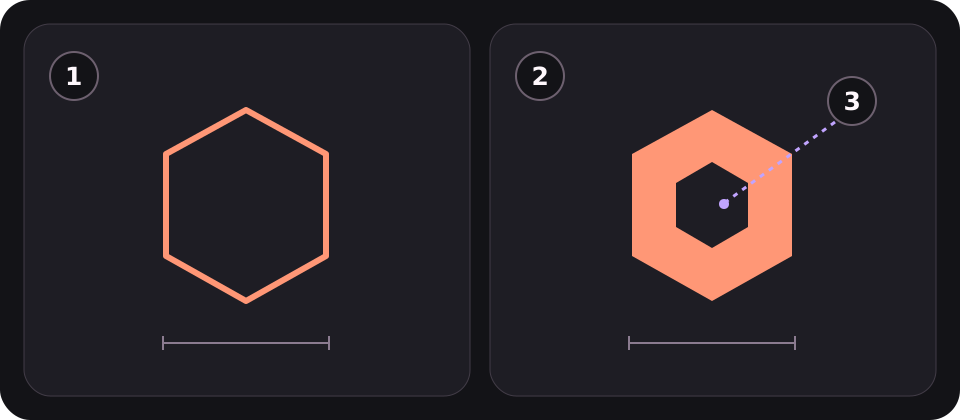
Separate outlines from filled areas
Trace a single path for an outline mark. For a filled mark, use closed boundaries; the centre of an O is an intentional opening. A thick stroke in a design app can still be a single path. Convert it to a closed shape on a copy only if the stroke’s full width is meant to be marked.
Further reading: LightBurn: Line / Fill · LightBurn: Open / Closed Paths
Clean up a production copy
Keep the editable original. Outline text in the supplier copy, remove hidden objects and duplicate paths, and check for open ends in shapes meant to be filled. Use real cutouts in the artwork rather than white objects that merely hide another shape. Open the export again and check dimensions and appearance.
Further reading: LightBurn: Delete Duplicates
Send a proof and request a sample
Send one production file and a labelled reference that shows the width, placement and marked areas. Ask the shop to confirm which areas it will leave untouched. Approve a test on the actual material and finish at final size before ordering the batch; small gaps and lettering can look different on the finished piece.
PUT IT INTO PRACTICE
Ready to prepare your pack?
logopack.app turns existing SVG artwork into an organized logo package. Preview your files, choose the available export options and check the result before handing it over. Exporting your own logo or icon files requires Pro.
Start with the logo pack generator, explore the sample ZIP, or compare the current plans.
Open generator